How to Predict Customer Churn From a Spreadsheet
Customer churn is the share of customers who leave. A model trained on your customer history ranks who is most likely to leave next. A measured example: $42,000 against $11,000 on 1,408 held-back customers.
In this article
Customer churn is when a customer stops buying from you — cancels a subscription, closes an account, or simply does not come back. Churn rate is the share of customers who leave in a given period:
churn rate = customers lost during the period ÷ customers at the start of the period
Churn prediction goes one step further: it uses your history of customers who stayed or left to estimate which current customers are most likely to leave next, so retention effort goes to them first.
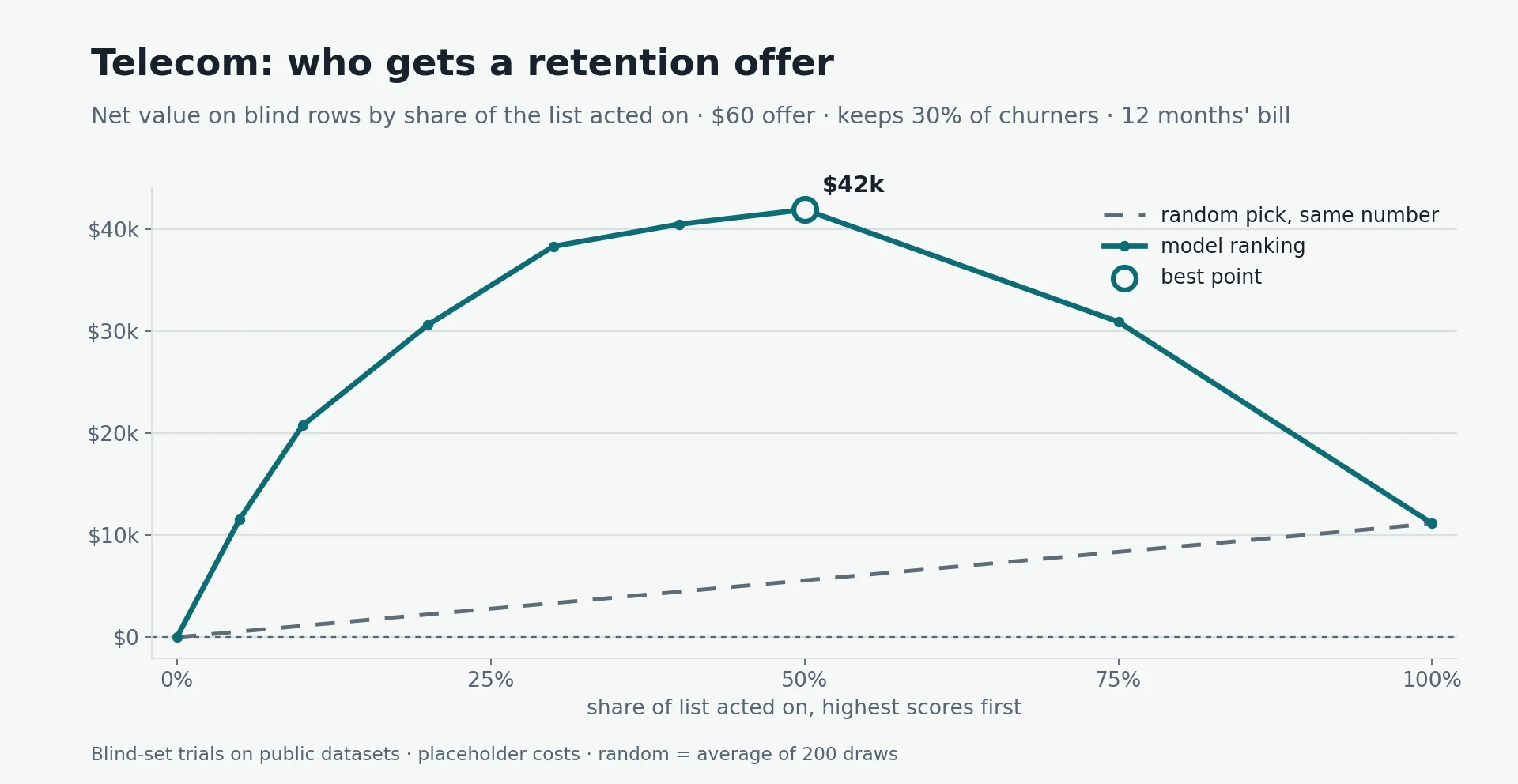
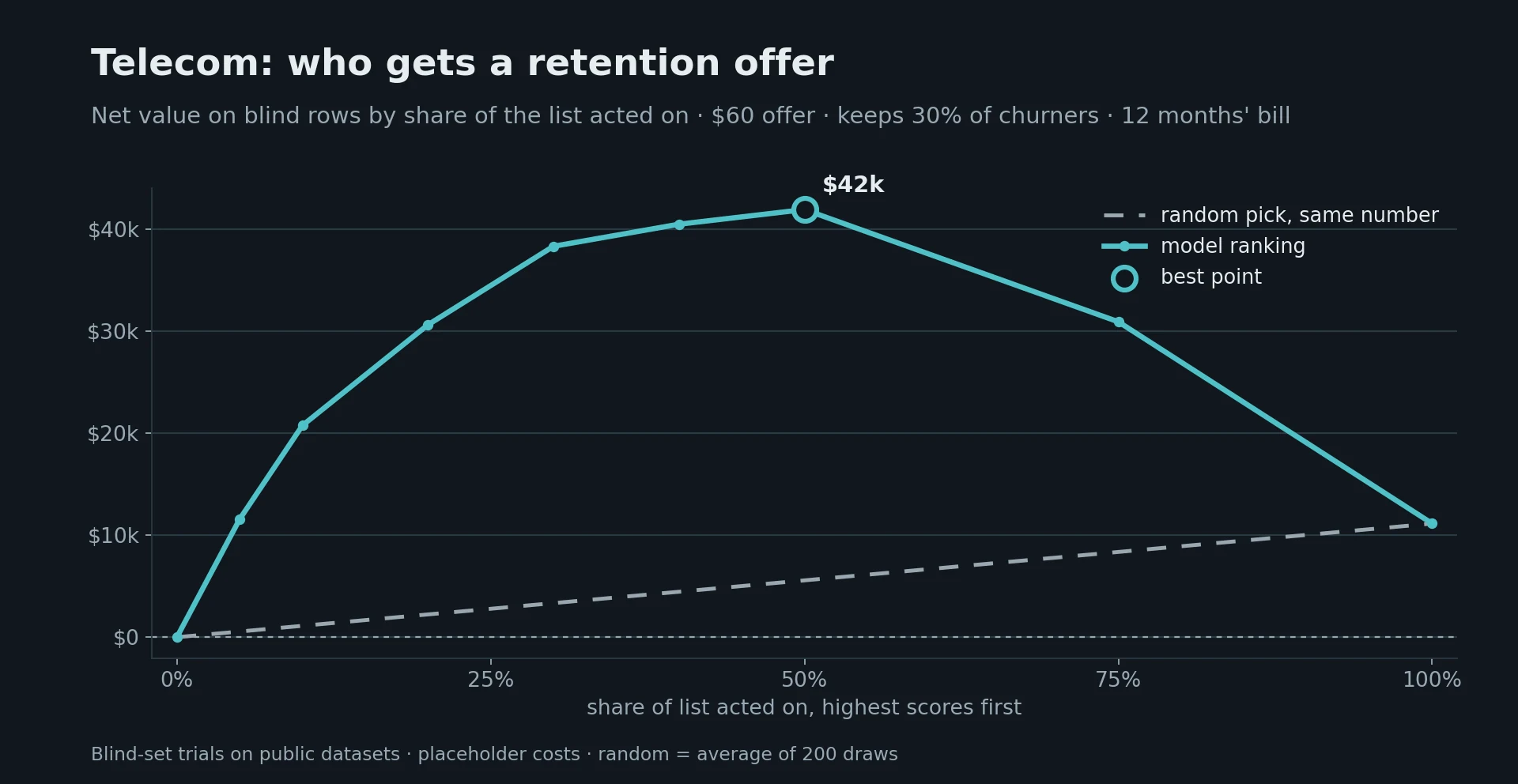
Measured example: on 1,408 customers held back from training in the IBM Telco sample, the 10% the model ranked most at risk churned at 72%, against 25% across all customers — almost three times as likely. Making a retention offer to the top-ranked half was worth about $42,000 net, against $11,000 for making it to everyone, using the placeholder costs below.
What your spreadsheet needs
One row per customer, and one column saying whether that customer left (yes/no) during the period you care about. The other columns describe the customer as they were before they left or stayed, for example:
- how long they have been a customer (tenure);
- what they buy and how much they pay each month;
- contract or plan type, and how they pay;
- recent usage, support contacts or complaints — if recorded before the outcome.
Leave out anything recorded because the customer left: cancellation reasons, final-bill flags, "sent to win-back" markers. Those columns give the answer away in historical data and are empty when you need a prediction. This is target leakage, and it is the most common reason churn models look excellent in testing and fail in use. Customer IDs should go too: they let a model memorise records instead of learning patterns.
A measured example: 7,043 telecom customers
What we measured
- Data: the IBM Telco Customer Churn sample — 7,043 customers, of whom 26.5% churned. Each row has the customer's tenure, services, contract type, payment method and charges.
- Test design: 20% of customers (1,408) were held back before any model was trained; every result below comes from them.
- Model: YourCloudGroup Model Manager ran its twelve-variant model tournament; a random forest won, with a ranking quality (AUC) of 0.83.
- Leakage check: the customer ID was excluded automatically; no other column was flagged.
- Placeholder costs: a retention offer costs $60; it keeps 30% of customers who would otherwise leave; a kept customer is worth 12 months of their bill.
How much each strategy earned on the held-back customers
| Customers who get the offer | Ranked by the model | Picked at random |
|---|---|---|
| Top 5% | $11,564 | $554 |
| Top 10% | $20,748 | $1,115 |
| Top 20% | $30,610 | $2,230 |
| Top 30% | $38,305 | $3,338 |
| Top 50% | $41,906 | $5,568 |
| Top 75% | $30,907 | $8,352 |
| Everyone | $11,136 | $11,136 |
What the result means
The value peaks when roughly the top half of the ranked list gets the offer. Below that point, each extra offer goes to someone with a real chance of leaving; beyond it, offers increasingly go to customers who were staying anyway, and the $60 cost outweighs the saving. Offering everyone still makes money in this example, but less than a third of what the ranking makes.
What the result does not show
The costs are placeholders: with a cheaper offer, the best cut-off moves further down the list; with a more expensive one, it moves up. The data is a public sample, not your customers. The top 20% of the list churned at 2.4 times the average rate — just short of the 2.5× target set before the test — so the model is useful but not spectacular. And because the dataset has no dates, the timing of each customer's departure could not be checked; the certificate records that as "not assessed" rather than assuming it.
How to predict churn in practice
- Export one row per customer with a left/stayed column for a fixed period (for example, "cancelled within 90 days").
- Remove post-churn columns and identifiers, and have someone who knows the data confirm the list.
- Train on most of the history and test on a held-back part — never judge a model on customers it learned from (held-out evaluation).
- Judge the ranking, not the accuracy. With 25% churn, a model that says "nobody leaves" is 75% accurate and useless; look at how many leavers sit at the top of the list, or at balanced accuracy.
- Put your own costs on it and pick the cut-off where value peaks.
- Score current customers each month and act on the top of the list; re-check the model as new outcomes arrive.
How YourCloudGroup Model Manager does it
YourCloudGroup Model Manager runs these steps from a CSV or spreadsheet in a browser, on a dedicated server: it seals a held-back test set, screens columns for leakage and identifiers, compares twelve model variants on the same test, and issues a certificate stating what was proven and what was not. Trained models can score new customer lists on a schedule. See the full set of business trials for the method and the other two cases.
Takeaway
Churn prediction is a ranking problem: the question is not "will this customer leave?" but "who should we talk to first?". With a few thousand past customers and an honest test, a model can concentrate leavers at the top of the list — in this example, almost three times the average rate — and your own costs decide how far down the list to go.
Sources
- IBM, Telco Customer Churn sample dataset.
- YourCloudGroup blind-set trials, 30 September 2026: Predictions from business spreadsheets.
Build predictive models from your own data
YourCloudGroup Model Manager builds, evaluates, certifies and schedules predictive models from your CSV or spreadsheet data — point and click, on your own dedicated server.
Learn about Model Manager →Published by YourCloudGroup. Read our editorial standards and corrections policy.


